Rebarkit
Reinforce your ribbon
Make light work of rebar detailing with focused tools that take repetitive clicks and clunky steps out of Autodesk® Revit®.
Latest release: v2.4.1 ·
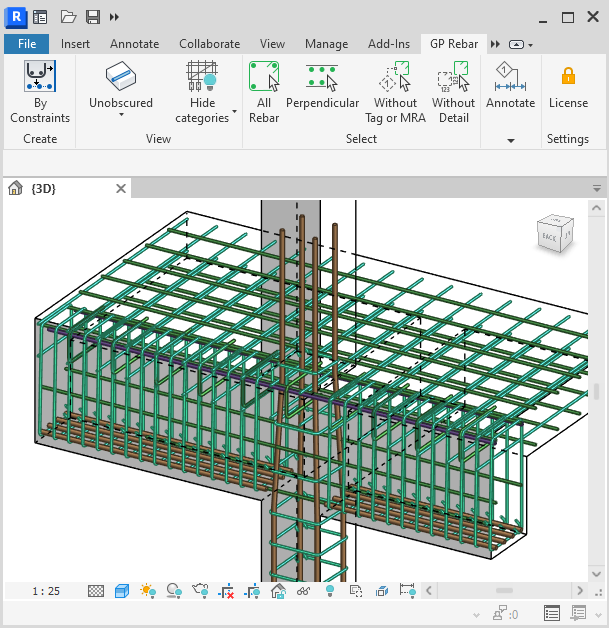
Speed up rebar detailing without creating work around the work
Rebarkit keeps the usual overhead out of the way: no trial deadline to work around, no new workflow to master, and no dependency left in your model.
No trial clock
Rebarkit is free to use with no countdown. Install it now, forget about it, and it will still be there the next time a rebar package lands on your desk.
Zero investment
No onboarding training required. A few focused tools sit in the ribbon, that are intuitive and self-explanatory.
Stay independent
Rebarkit creates plain Revit elements. Your model remains fully functional without the add-in, you don't get locked-in.
Tools that earn their place in the ribbon
Focused commands for the details that slow a drawing package down.


Resources
Useful beyond the ribbon
Practical resources for building a more reliable Revit detailing workflow.
Services
Need more than the toolkit?
GRevity Point can help when the right answer is a service, not another button.
Newsletter
Want to stay in the loop?
Highlights and tips for the structural discipline in Revit, so you can stay up-to-date with the latest developments.
- News about Revit and Autodesk.
- Structural detailing workflows that save repetitive steps
- Rebarkit developments worth knowing about
A few emails a year, respecting your time and inbox.

Behind the tools
Built by a structural engineer, for structural engineers
GRevity Point grew out of real project pressure and the search for more practical ways to work in Revit.
Meet Gábor and see where the work startedRebarkit
Install now. Rebarkit will be there when you need it.
Free to try, no deadline. No license server, no admin rights, just a quick install.